As a tech enthusiast, I've been eager to get my hands on the latest Raspberry Pi 4 and I'm excited to share my thoughts on this impressive device. The Raspberry Pi 4 Model B with 4GB of RAM is the latest iteration of the popular single-board computer, and it promises to deliver significant performance improvements over its predecessors.
Hardware and Performance
The
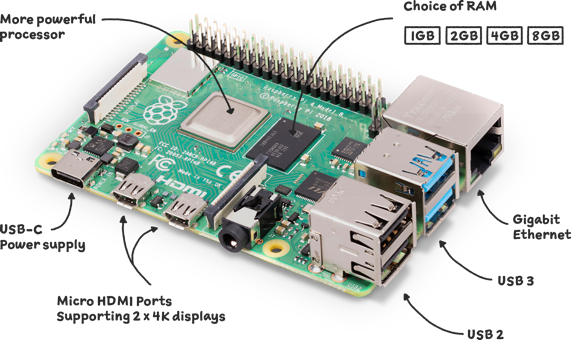
Raspberry Pi 4 boasts a quad-core Cortex-A72 processor, which provides a
substantial boost in processing power compared to the Raspberry Pi 3.
With 4GB of LPDDR4 RAM, this board is well-equipped to handle demanding
tasks and multitasking with ease.
In
terms of connectivity, the Raspberry Pi 4 features dual-band 802.11ac
Wi-Fi, Bluetooth 5.0, and Gigabit Ethernet, making it an excellent
choice for projects that require reliable internet connectivity. The
board also includes two USB 3.0 ports, two USB 2.0 ports, and two
micro-HDMI ports that support 4K output at 60Hz.
Connectivity Options
The Raspberry Pi 4 features:
- Dual-band 802.11ac Wi-Fi
- Bluetooth 5.0
- Gigabit Ethernet
- Two USB 3.0 ports
- Two USB 2.0 ports
- Two micro-HDMI ports supporting 4K output at 60Hz
Setting Up and Using the Raspberry Pi 4
I
purchased the starter kit from Pi Hut, which included the Raspberry Pi
4, a power supply, a USB stick with the OS pre-installed, and a generic
case. I also bought a power button separately.
Setting
up the Raspberry Pi 4 was straightforward, and I was impressed by the
ease of use. However, I did notice a slight delay with wireless keyboard
and mouse inputs, which disappeared when switching to wired
peripherals.
Storage and OS
Initially,
I used the provided microSD card for storage, but later replaced it
with an old laptop HDD connected via a SATA-to-USB wire and case. This
provided more storage and a more traditional boot drive experience.
I used the Raspberry Pi Imager to flash the OS and experiment with other Linux-based operating systems like Ubuntu.
Remote Access and Server Setup
I
set up VNC for remote access and configured the Raspberry Pi as a
server for hosting websites, running scripts, and even a Minecraft
server. The low power consumption (around 3W) made it an ideal choice
for a low-maintenance server.
Cloud Computing and Decentralization
One
of the key benefits of using a Raspberry Pi is its potential to
alleviate concerns related to cloud computing. As David Heinemeier
Hansson, creator of Ruby on Rails, has pointed out, cloud computing can
come with significant drawbacks, including rising costs, security risks,
loss of control, and the formation of large monopolies.
By
using a Raspberry Pi as a server, individuals and organizations can
take control of their infrastructure and data, promoting a more
decentralized approach to computing. This can be particularly beneficial
for big businesses and projects, where reliance on cloud services can
become costly and risky.
Projects and Applications
The Raspberry Pi 4 is an excellent device for various applications, including:
- Media centers and retro game consoles
- Home automation systems and IoT projects
- Educational tools for teaching programming and robotics
I found many project ideas on pimylifeup.com, including hosting websites, running web scraping scripts, and more.
Challenges and Solutions
One
issue I encountered was thermal throttling due to the default case's
poor ventilation. I resolved this by purchasing a new case with a 40mm
fan and heatsinks, which significantly improved performance.
Conclusion
The
Raspberry Pi 4 (4GB) is an outstanding device that offers impressive
performance, robust connectivity, and endless possibilities for makers
and hobbyists. While I wish I had opted for the 8GB version and a more
powerful ARM CPU, the Raspberry Pi 4 remains an excellent choice for
those seeking a low-maintenance, low-cost server or project platform.
Overall,
I'm excited to continue exploring the Raspberry Pi 4's capabilities and
discovering new projects and applications for this powerful mini
computer.